

how to create contact form in html and also know how to create menu in html.


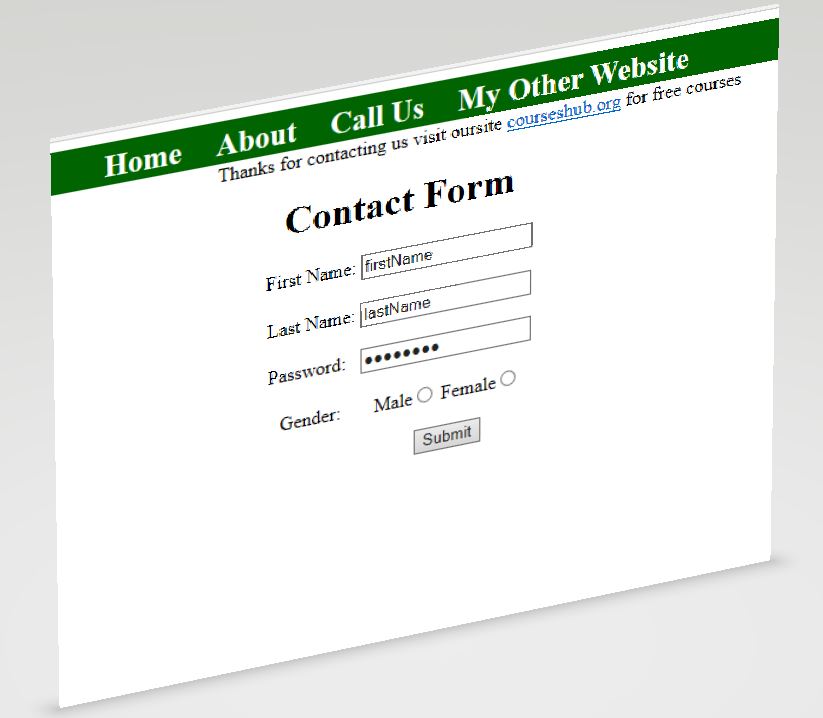
Write the following code into your notepad and save it with name.html then double click it you will see:
<!DOCTYPE html>
<html>
<head>
<title>
</title>
<style>
#nav{
background-color:darkgreen;
height:35px;
font-size:25px;
font-weight:bold;
font:Tahoma;
}
#nav ul {
padding:0;
margin:0;
text-align:center;
}
#nav li {
display:inline;
padding:3px;
vertical-align:middle;
}
#nav a{
text-decoration:none;
color:#00F;
padding:8px 8px 8px 8px;
color:white;
vertical-align:middle;
}
#nav a:hover{
color:black;
background-color:white;
}
</style>
</head>
<body>
<nav id="nav">
<ul>
<li> <a href="#">Home</a>
<li> <a href="#">About</a>
<li> <a href="#">Call Us</a>
<li> <a href="https://courseshub.org">My Other Website</a>
</ul>
</nav>
<marquee behaviour ="alternate">Thanks for contacting us visit oursite <a href="https://courseshub.org">courseshub.org<a/> for free courses</marquee>
<center><form name="contactForm" class="form">
<h1>Contact Form</h1>
First Name: <input type = "text" value="firstName" name="txtfield" ><br><br>
Last Name: <input type = "text" value="lastName" name="textfield"><br><br>
Password:   <input type = "password" value="password"><br><br>
Gender:       Male<input type = "radio" value="Male" name = "radioButton">
Female<input type = "radio" value="Female" name = "radioButton"><br><br>
                    <input type="button" value="Submit" name="submitButton">
</form></center>
</body>
</html>
